Real Piano electronic keyboard
- 4.5
- Rating
- 10.00M
- Installs
- Free
- Price
 Analysis by App-foxy
I approached Real Piano as something I could open for a quick musical break rather than as a replacement for a physical keyboard. That distinction matters. This is a free music game from Kolb Apps, built around the simple pleasure of tapping piano keys on a phone or tablet. The idea is immediately understandable, but the quality of the experience depends on details such as touch response, screen space, sound, and how comfortably the app fits into a real daily routine.
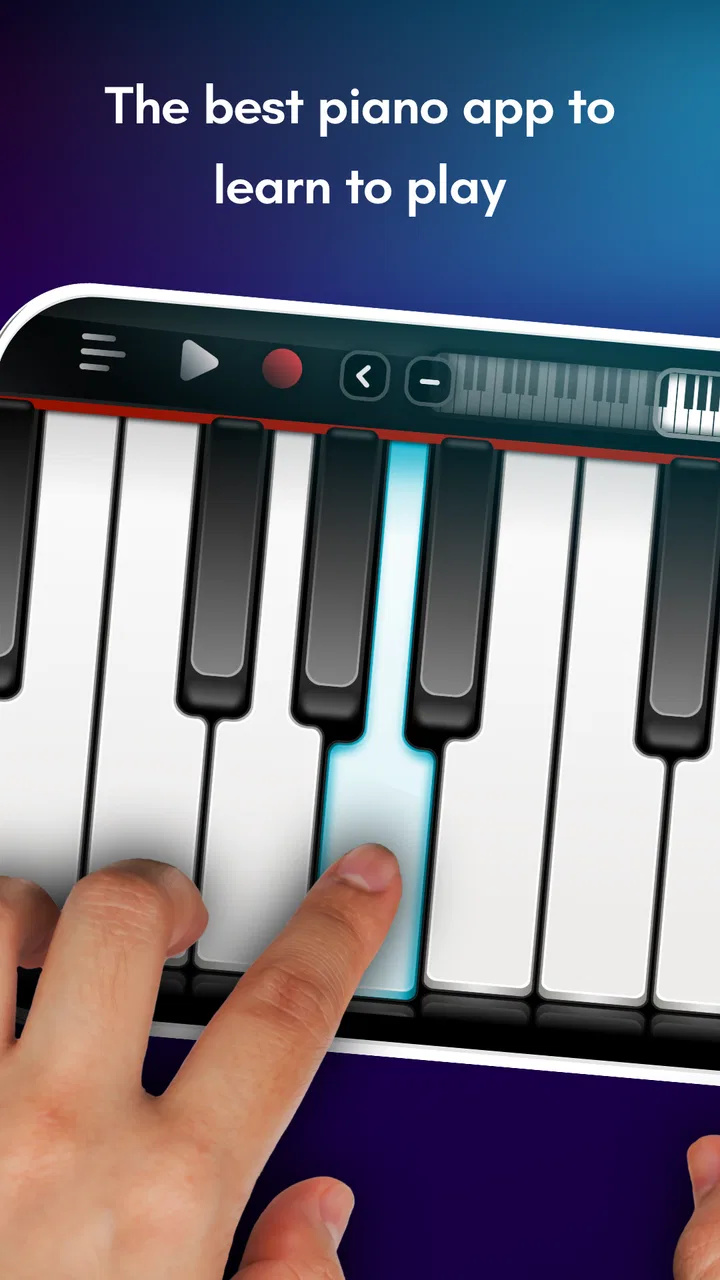
My first impression was that it feels more like a playable instrument than a conventional game with a decorative music theme. There is no complicated fictional setting to learn and no story competing for attention. The keyboard is the setting. The keys, notes, rhythm, and the physical layout of the device create the mood. That makes the app easy to pick up, especially when I only have a few minutes and want to experiment rather than commit to a long session.
The store presents it as a piano and keyboard app for learning and playing anywhere, and that description is a useful starting point, although I would keep expectations realistic. A touchscreen can encourage practice and help a beginner understand note order, but it cannot fully reproduce the feel, resistance, or expressive control of a real instrument. Its strongest role is as a convenient musical sketchbook: something I can use to explore melodies, repeat a small passage, or satisfy the urge to play when a piano is not nearby.
You May Also Like

 Blood Strike: 2.5 Anniversary
Blood Strike’s Loadouts Turn Every Drop Into a Tactical Gamble
A close look at Blood Strike’s custom loadouts: how fast access to signature weapons reshapes its battle royale rhythm, rewards preparation, and narrows the gap between fights.

 Pandora - Music & Podcasts
Pandora’s Music Is Easy to Start, but Harder to Recover
Pandora’s strength is its low-effort path from a seed to a station. Its weak spot is how much confidence it asks you to place in connection, setup, and quiet recovery.

 8 Ball Pool
 Is Built on Rivalries, Rematches, and Routine
A close look at the rivalries, rematches, shared routines, and unanswered safety questions that turn a quick pool match into a persistent mobile community.

 Samsung Music
’s Quiet Strength Is Playing What You Already Own
Its reach comes less from spectacle than from dependable access to a personal library. That simplicity is both the app’s strongest retention engine and its ceiling.

 AccuWeather: Weather Radar
AccuWeather Review: A Quick, Clear Forecast for Everyday Decisions
For everyday plans, the best forecast is the one you can understand quickly. AccuWeather makes rain timing, radar, and local conditions easy to act on, with a few trade-offs.

 Hill Climb Racing
Why Hill Climb Racing Still Turns Crashes Into One More Run
A tiny car, a bumpy hill and one more upgrade: Hill Climb Racing keeps resurfacing because its simple chaos makes every near-miss feel personal.
More From Our News Desk
View All News


How Real Piano turns a simple keyboard into a playable mood
I find the app’s appeal less in pretending to be a full piano and more in making a few minutes of musical curiosity feel worthwhile. Its keyboard-first approach gives a casual session a calm, personal rhythm, whether I’m checking a melody or simply exploring how notes sit together. That focus also makes the limits of a touchscreen easier to judge, which is where the choice of device and playing goal really matters.
A first session that gets out of the way
The biggest advantage is the low barrier to entry. I do not need to understand music theory before touching the keyboard. A beginner can start with individual notes, try a familiar melody by ear, or use the app as a visual map of the piano. That directness is important because many learning tools make the first session feel like paperwork. Here, the instrument itself is the invitation.
It also works well for short, unplanned sessions. I can imagine opening it while waiting for an appointment, checking a melody that suddenly comes to mind, or showing a child how notes move from low to high. Those moments do not require a complete lesson plan. They require an interface that responds quickly enough to keep the idea alive, and a virtual keyboard is naturally suited to that kind of spontaneous use.
At the same time, the phone form factor creates an immediate compromise. A narrow display limits how many keys can be comfortably visible and played at once. On a larger tablet, the keyboard has more room to breathe; on a small phone, finger placement becomes more demanding, particularly when I try to play chords or move quickly between distant notes. I would therefore treat screen size as part of the experience, not as a minor technical detail.
For a first-time learner, I recommend beginning with one hand and a very small musical goal. Play a few notes slowly, identify their positions, and repeat the pattern until the fingers stop searching. Jumping straight into fast playing can make the app feel less accurate than it really is because the limitation may be cramped touch targets rather than the instrument itself.
A visual language built around the instrument
The app’s visual identity is strongest when it stays focused on the keyboard. Unlike rhythm games that cover the screen with animated lanes, characters, or constant rewards, this experience places attention on the relationship between the finger and the note. The setting is intentionally spare: the keyboard provides the structure, while the player supplies the musical personality.
That restraint creates a calm, almost private mood. I can concentrate on a phrase without feeling that the app is trying to turn every mistake into a dramatic event. For casual playing, this is a strength. It makes the experience feel less like a test and more like a small room where I can try ideas safely.
There is a trade-off, though. Players who expect a music game to offer a rich visual world, a campaign, or a stream of animated challenges may find the presentation plain. The lack of a broader fictional setting is not a flaw in the same way it would be in an adventure game; it is simply a sign that Real Piano is organized around instrument access rather than spectacle. If visual progression is what keeps you motivated, a dedicated rhythm title may give you more immediate excitement.
I also find that the uncluttered presentation makes the app useful for different ages. Its content rating is Everyone, which fits the straightforward concept. A child can explore the keys without needing to understand a complicated interface, while an adult can use it for quick practice or musical curiosity. Supervision and patience still matter for younger players, not because the concept is difficult, but because tapping randomly can become more entertaining than listening carefully.
Sound is the center of the experience
With a virtual piano, sound quality is more important than visual polish. A keyboard that looks convincing but produces a thin or distracting tone will quickly lose its appeal. In my view, Real Piano works best when I listen critically rather than expecting the depth of an acoustic piano. The phone speaker is the final link in the chain, and its small size naturally limits warmth and dynamic detail.
Headphones can make a meaningful difference when I am trying to judge notes or play quietly. They also help preserve the mood of a session in a shared room. On speakers, the experience is more social and immediate, but the sound can feel less intimate. This is one of those cases where the same app can feel like a casual toy in one setting and a more focused practice aid in another.
Rhythm is where the game-like side becomes most useful. Even without treating every session as formal training, repeating a phrase at a steady pace encourages me to notice timing instead of only chasing correct notes. I get more value when I slow down, listen to the gaps between taps, and repeat the passage consistently. Speed is tempting because it feels energetic, but control is what makes a short session musically satisfying.
A practical routine is to play a melody once from memory, then try it again while paying attention to where the beat falls. After that, I repeat only the awkward section rather than restarting the entire piece. This turns the app into a focused tool instead of endless tapping. It is a small change, but it makes the difference between passing time and actually building familiarity with a phrase.
I would not choose this app as my only path to serious musicianship. It can support note recognition, hand coordination, and musical play, but it does not replace a teacher’s correction, a full-sized keyboard’s physical feedback, or structured theory work. Someone preparing for an exam or developing advanced technique will need a more complete learning setup. Real Piano is better at keeping music close at hand than at delivering a complete curriculum.
Where the mechanics fit and where they resist
The core mechanic is refreshingly direct: tap keys, hear notes, and shape a melody through repetition. That simplicity is the reason the app is approachable, but it also means the experience depends heavily on the quality of the touch interaction. When I play slowly, the layout makes sense. When I try quick passages, the available space becomes more important than my musical intention.
For chords, I prefer a larger screen whenever possible. Multiple fingers on a phone can cover neighboring keys or land slightly off target, especially if I hold the device in an awkward position. A tablet gives the hands more room and makes the keyboard feel less like a row of buttons. If your main goal is chord practice, device size should influence your decision more than the app’s free price.
There is also a difference between learning a melody and learning piano technique. The former can work well with a touchscreen because I can see the note layout and repeat a sequence. The latter is limited because the surface does not teach the weight, rebound, or subtle pressure of a piano key. I see Real Piano as a bridge for musical ideas, not as a substitute for the physical habits developed on an instrument.
Its long availability also says something about the concept’s durability. The game was released on August 13, 2012, and the current version is 5.46.0. That places it in the category of established mobile music tools rather than a brand-new experiment. The minimum operating system is Android 7.0, so users with older devices should check compatibility before planning around it.
The audience size is substantial: it has passed ten million installs, with an average rating of 4.4 from around 142 thousand ratings and roughly 4.3 thousand written reviews. Those figures do not prove that every player will enjoy the touch layout, but they do suggest that the basic idea has remained useful to a broad mobile audience. I would read that popularity as reassurance about relevance, not as a promise of professional-level piano performance.
Free access, with a boundary to consider
Real Piano is free to download and play, which makes it easy to test without turning the decision into a purchase. That is especially helpful here because personal comfort depends on the device, finger size, listening setup, and expectations. A few minutes of direct use will tell you more than a feature list about whether the keyboard feels natural.
There are in-app purchases ranging from $1.99 to $18.99 per item. I would keep that in mind if you are looking for a completely unrestricted experience at no cost. The free entry point is attractive, but optional purchases can change how comfortable the app feels over time, depending on what you want from it. Before spending, I would first decide whether you are using it for occasional play, regular practice, or a more expansive keyboard experience.
This pricing structure also affects who should skip it. If you dislike mobile games that offer paid extras, or if you already own a digital piano with a much better keybed, Real Piano may not add enough value to justify becoming part of your routine. On the other hand, someone who wants an immediately available instrument and is willing to evaluate purchases selectively may find the free starting point sensible.
Everyday scenarios where it makes sense
One realistic use is a songwriter capturing a melody before it disappears. You may be away from your instrument, remember only the contour of a chorus, and need a keyboard to find the next note. Real Piano can help you test the idea quickly. It will not replace a recording setup, but it can act as a temporary reference when the important thing is discovering the notes before the moment passes.
Another scenario is a beginner who has started learning elsewhere and wants a low-pressure way to review note positions. Five minutes of repeating a simple phrase on a phone can reinforce familiarity during travel or a break. The key is to keep the exercise narrow. Trying to recreate a full lesson on a small touchscreen is likely to be frustrating; checking one pattern is much more realistic.
It can also work as a shared activity. A parent and child can take turns identifying high and low notes, copying a short rhythm, or inventing a tiny melody. Because the interface is immediately legible, the activity does not need a lengthy explanation. The best results come when the adult encourages listening and repetition rather than treating every tap as a performance.
For a party or group setting, however, I would choose a different kind of music game. Real Piano is introspective and instrument-centered. It does not create the same instant competitive energy as a title built around scoring, timed note lanes, or multiplayer challenges. Its mood is closer to experimenting alone than entertaining a room full of people.
How it compares with a physical keyboard and rhythm games
Compared with a physical keyboard, the advantage is obvious portability. The app is already on a device I can carry, and I can use it in places where bringing an instrument would be unreasonable. The disadvantage is equally clear: the touchscreen gives me less tactile information, less room, and less expressive control. For serious technique, the physical keyboard wins. For availability, the app wins.
Compared with a piano-learning service, Real Piano feels less structured. A lesson platform may guide me through a planned sequence, explain posture, track progress, or connect practice to a broader curriculum. This app is more open-ended. That makes it less intimidating for casual users, but it also means I have to create my own goals. If you need accountability, guided instruction is probably the better choice.
Compared with a rhythm game, the balance shifts in the other direction. Rhythm games usually provide stronger pacing, clearer objectives, and more immediate feedback about success or failure. Real Piano offers a more direct relationship with the keyboard and leaves more room for improvisation. Choose the rhythm alternative when motivation comes from challenges; choose this one when you want to explore notes without being pushed through a track.
One useful compromise is to use Real Piano between more formal sessions. I can use a lesson app or real keyboard for technique, then return here to remember a melody or experiment freely. That workflow respects the app’s strengths instead of asking it to solve every musical problem.
What I would check before committing
Before installing, ask yourself what you actually want to do. If the answer is “play a few notes anywhere,” the app is a natural fit. If the answer is “learn advanced piano technique,” it should be treated as a supplement at most. If the answer is “play a competitive music game,” another category will likely suit you better.
Then consider your device. A small phone is convenient, but a larger display can make two-handed playing and chord shapes more comfortable. Try the app in the position you expect to use most often rather than judging it only while holding the device casually. Comfort changes the whole experience, especially during repeated practice.
Finally, decide how you respond to optional spending. Since the app is free with purchases from $1.99 to $18.99 per item, I would begin with the basic experience and identify a specific reason before buying anything. Paying can make sense when it solves a real limitation for your use, but it is not necessary to prove whether the core idea works for you.
My atmosphere verdict
Real Piano succeeds because its mood is coherent. The visual setting stays close to the keyboard, the sound is the main event, and the pacing is controlled by the player rather than by a story or a stream of missions. That gives it a quiet, accessible character. I can open it for a minute, stay for a longer improvisation, or use it to check a melody without feeling that I have entered a complicated system.
Its limitations are part of the same design. A touchscreen cannot offer the physical response of a piano, a compact display can make fast or chord-heavy playing awkward, and the open-ended format will not satisfy everyone who needs structured lessons or competitive goals. Those are important boundaries, not reasons to dismiss the app.
Kolb Apps has made a practical music game for people who want a keyboard close at hand. With its Everyone rating, free entry, mature release history, and large audience, it is easy to recommend as a first experiment or a portable companion to real practice. I would recommend it most strongly to beginners, casual players, melody hunters, and anyone who enjoys making small musical discoveries during ordinary parts of the day.
My honest recommendation is to treat Real Piano as a pocket instrument, not a complete piano course. Used that way, it creates a focused and surprisingly personal playable mood: tap a key, hear the result, adjust the rhythm, and try again. If that simple loop is what you are looking for, it is worth installing. If you need tactile realism, guided progression, or high-energy competition, your money and time will be better spent on a physical keyboard, a structured learning app, or a dedicated rhythm game.
FAQs for Real Piano electronic keyboard
01What features does the Real Piano app offer?
The Real Piano app offers a wide variety of features, including multiple keyboard themes, adjustable piano size, and a library of songs to learn and play. It also includes recording capabilities, multi-touch support, and various sound effects to simulate different types of pianos and other instruments.
02Is the Real Piano app suitable for beginners?
Yes, the Real Piano app is designed to cater to users of all skill levels. Beginners will find the user-friendly interface and tutorial modes helpful for learning the basics, while more advanced users can enjoy the complex sound features and recording options to refine their skills.
03Does the Real Piano app require an internet connection?
The Real Piano app can be used offline for basic piano playing and practicing. However, an internet connection is required to download new songs, access updates, or use any online features such as cloud saving or community sharing options.
04Are there in-app purchases in the Real Piano app?
Yes, the Real Piano app offers in-app purchases. These may include premium features like additional sound packs, ad-free experience, or advanced tutorials. Users can enjoy the basic features for free, but some advanced functionalities may require payment.
05How does Real Piano compare to other piano apps?
Real Piano stands out due to its realistic sound quality and extensive feature set, including customizable keyboards and a wide range of instruments. While other apps may focus solely on learning or entertainment, Real Piano offers a balanced combination of both, appealing to users looking for a comprehensive piano app.
Pros
- User-friendly interface
- easy for beginners.
- Wide range of sound options available.
- Supports MIDI connectivity for recording.
- Customizable keyboard layout for preference.
- Interactive tutorials enhance learning experience.
Cons
- Contains ads that can interrupt practice.
- Advanced features require in-app purchases.
- Limited free sound options available.
- Occasional latency issues on older devices.
- Requires internet for certain features.

Real Piano electronic keyboard
Gallery